Auction cataloging software that comes before the bidding platform
Cataloging is the work between the consignor's arrival and the first bid. Lotdesk is software for that part only, built to hand its result to whichever platform runs the sale.
Where it sits
| Stage | What happens | Where it is done |
|---|---|---|
| Intake | The consignor arrives with goods; you take their name, reference and terms. | Lotdesk |
| Cataloging | Each piece is photographed, described, graded, estimated and numbered. | Lotdesk |
| The printed catalog | The sale laid out lot by lot, section by section. | Lotdesk |
| Handover | The lots and photographs go into the platform you sell on. | Lotdesk writes the file; your platform reads it |
| The sale | Bidding, the rostrum, invoices, settlement. | Your auction software |
What the software holds
- Consignors with their own code, their commission and settlement terms, and their lots.
- Sales and sections in the order the room is worked, with lot numbers that never repeat in a sale and sublots (27A) that sit after their lot.
- Lots with up to 12 photographs, description, condition grade and note, estimate, start bid, reserve, quantity, category and dimensions. The reserve is private: it is written only into the files that import it, and never into a public one.
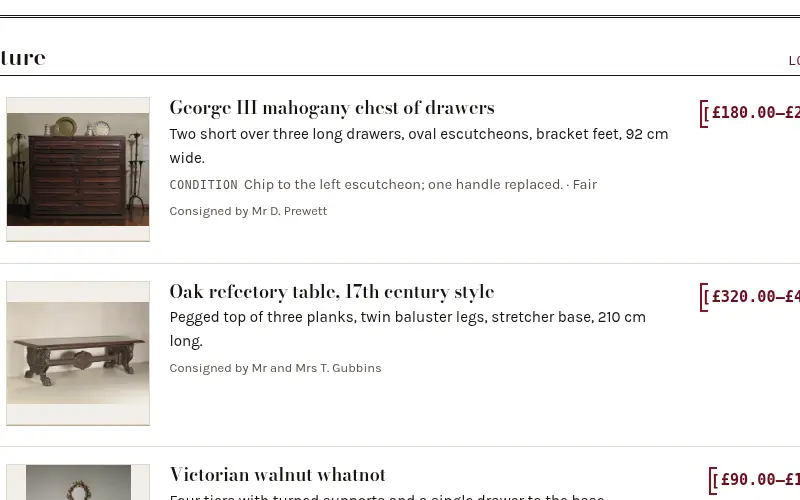
- The catalog, printable from the browser, with the photograph beside every entry.
Moving in, moving on
A sale is not locked in. It comes in from a spreadsheet or another system's export (Auction Flex, LiveAuctioneers, Wavebid and HiBid files are recognized by their headings, and a plain file works too), and it goes out in the format of Auction Flex, LiveAuctioneers, Wavebid or HiBid. Each page says exactly which header names and limits it follows, and how sure that is.
Open a book — free for your first 25 lotsLook at the sample sale first